Fast DVD Ripper, Rip/Convert DVD to any format videos, AVI, MP4, MKV, TS/M2TS, MOV, WMV, Divx, Xvid, H264/AVC, etc.
Fast DVD Ripper, Rip/Convert DVD to play well on iPod, iPad/iPad2, iTouch, iPhone, Apple TV, PSP/PS, Xbox360, etc.
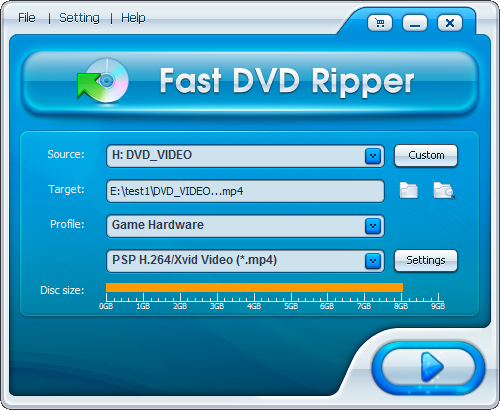
Step1: Insert a DVD movie disc into the DVD drive, then drop-down click Source, it will look like below, simply select the DVD dirve as Source.
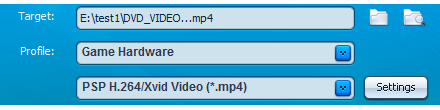
Step2: Select a hard drive folder as Target and Select a Profile. - Here we select "E:\test1\" as Target, and select "Game Hardware->PSP " as Profile, the program will rip/convert source DVD movie to the best PSP mp4 video file and save onto computer "E:\test1\" folder.
Step 3: Press "" to start ripping/converting. Once the conversion process finished, you will get right MP4 files for PSP.
Tags: DVD Ripper, DVD Ripper software, Rip DVD, Rip DVD Movie, Rip DVD movies, DVD to PSP, Rip DVD to PSP, Convert DVD to PSP,






 " to start ripping/converting. Once the conversion process finished, you will get right MP4 files for PSP.